Introduction
Introcuction of Pryme Intercompany
Master data is the foundation for intercompany projects. It refers to customers, resources and projects. With Pryme Intercompany, you can:
- Transfer data between different tenants (databases), no matter where they are located.
- Improve data quality by sharing it in a reliable way.
- Eliminate manual work — no more copying data from one company to another.
Maintain a single source of truth for master data to ensure consistency across all companies in your group.
You have two options sharing your data:
- Centralized data sharing: Act as the primary source of data for the entire group.
- Dynamic data exchange: Easily transfer data between companies as needed.
Both options ensure that every company has access to the same accurate and up-to-date information.
Introduction video Pryme intercompany.
We have two specialized apps to make master data sharing simple
- Pryme Intercompany Data Management
An extension for Microsoft Dynamics 365 Business Central that manages, shares, and automatically processes master data between any selection of companies. - Pryme Intercompany for Projects
An extension for managing and sharing project, resources, and entries for time, expenses and items. This app requires Progressus Advanced Project.
1 - Design details
Messages are organized in Topics that are made available to multiple Subscribers. A Publisher posts new messages to the Topic and notifies Subscribers as illustrated on the following flow chart.
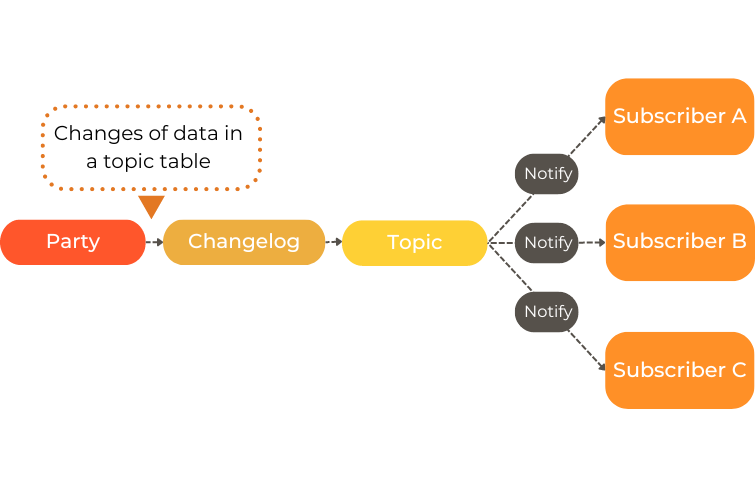
Messaging pattern
New record
| Publisher (Topic) | Subscriber (Subscription) |
|---|
| A user creates a new record – the changelog is updated. | |
The data is converted to:
Topic record
Topic message | |
| Notifies the subscribers that new Topic messages is available. | |
| Requests to receive new Topic messages. |
| Returns the new message to the subscriber. | |
| Saves the received message as a Subscription message. |
| Sends feedback to the publisher. |
| Registers consumed Topic messages. | |
| Creates a Subscription record and process it. |
Update record
| Publisher (Topic) | Subscriber (Subscription) |
|---|
| A user updates a record – the changelog is updated. | |
| The publisher converts the data into a Topic message. | |
| Notifies the subscribers that new Topic messages is available. | |
| Requests to receive new Topic messages. |
| Returns the new message to the subscriber. | |
| Saves the received message as a Subscription message and process it. |
| Sends feedback to the publisher. |
| Registers consumed Topic messages. | |
Link to Youtube.
2 - Terminology
Learn about the different components used in Pryme Intercompany.
Pryme Intercompany makes it easy to transfer data between Business Central companies using Messages. For this purpose, there are three main components:
Party
A Party is a Business Central company that exchanges data with other companies using data messages. All companies must agree on a unique party code. This code identifies each company in the system.
Tip
Use a clear and scalable naming convention. Example: Instead of “UK,” use “UK10,” “UK11,”….Topic
In the publishing company, the data messages are organized in Topics. The topic defines:
- Which tables and fields are included in the data message.
- Restrictions or filters that determine which records are made available.
- When and which subscribers should be notified.
When the publisher detects a new or an updated record, the Topic notifies the subscribers that new data is available to pull from the publisher.
Topic records
When a publisher detects a new record, the data is converted into a Topic record. It describes what kind of data the Topic contains. It does not contain any actual data. It defines:
- Which tables and fields are included
- Any filters that limit what data is published
- Rules or metadata that help Subscribers understand the Topic
- Who is allowed to subscribe
Topic messages
The Topic message is created when a publisher detects a new or and updated record. It contains the actual data that is sent to the Subscribers when they request new messages.
Topic register
The register keep track how far we are, last created message and if there were any errors on the last run.
Subscription
The Subscription is what allows a subscriber to receive, store, and process data that another company (parties) makes available through Topic messages. The subscription pulls data from the Topic and confirms back to the Publishers what has been received.
Subscription Records
A Subscription Record describes how a Subscriber wants to receive and store data from a Topic. It doesn’t contain any actual data.
The Subscription record is created when a new record is received through a Topic message.
It contains:
- Which party to receive data from
- The owner of the record
- Target tables
- Target fields
- Mappings from Topic fields (source) → Subscription fields (target)
- Filters (if any)
Note
The Subscription record tracks the owner of the record, and if it was originally created by another company. If this is the case, the field Data Owned by Party is enabled, and any local changes will not be sent to other companies.
If a record, such as a payment term, was created outside the Intercompany (IC) process, there will be no agreement on ownership. Consequently, changes made across companies will be synchronized and transferred to all companies. To resolve such conflicts, disable the Data owned by party field.
Subscription Messages
When the Subscriber requests data from a party, the incoming Topic message is converted to a Subscription message. It contains the actual incoming data, and it is processed according to the Subscription Record’s mapping and rules.
If it’s a new record, the Subscription Message creates a Subscription Record. If the message is an update of an existing record, no new Subscription record is created.Subscription register
The register keep track how far we are, last created message and if there were any errors on the last run.